
Website Migration SEO Checklist: How to Migrate a Website Without Losing Rankings
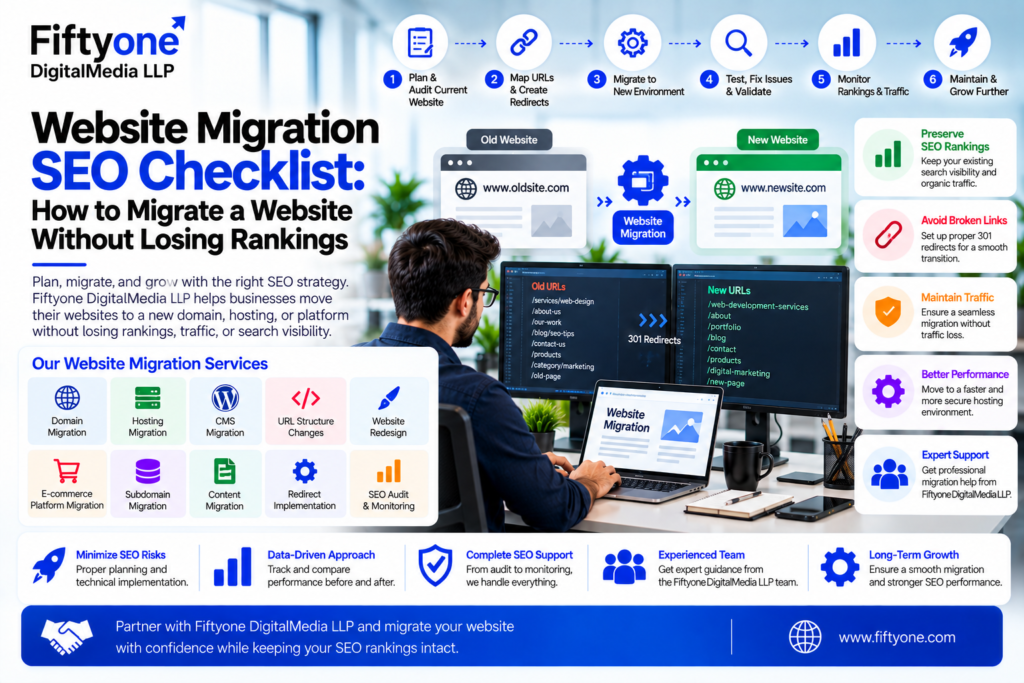
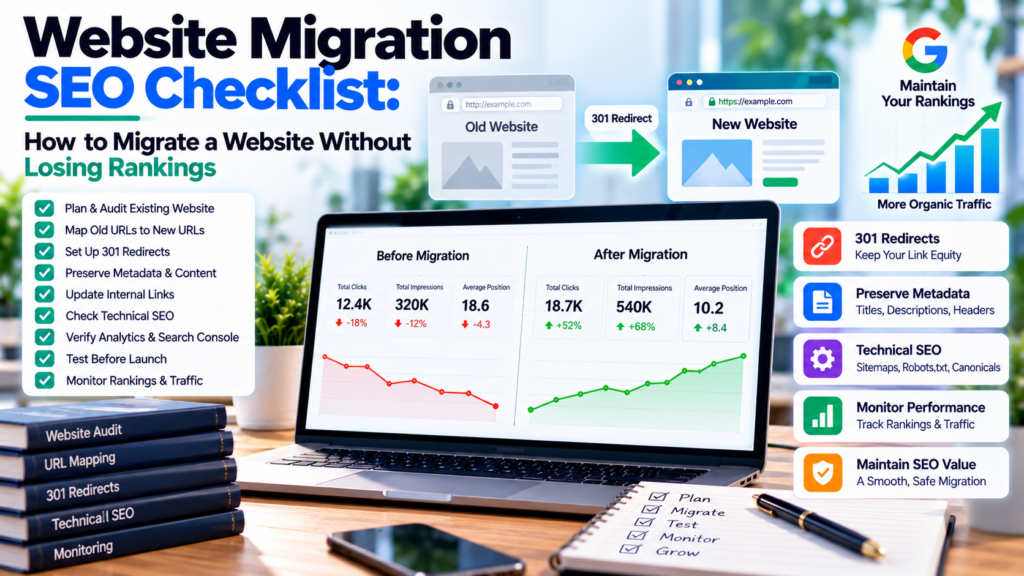
Website migration can be a major technical project. Whether you are moving from one hosting provider to another, changing your CMS, redesigning the website, moving from HTTP to HTTPS, changing domains, or restructuring URLs, every migration can affect SEO. Fiftyone Digitalmedia LLP helps businesses plan and implement website migrations with a focus on maintaining website performance, search visibility, and a smooth transition.
A poorly planned migration can lead to broken links, missing pages, incorrect redirects, duplicate URLs, indexing problems, lost rankings, and a significant drop in organic traffic.
The good news is that most migration-related SEO problems can be prevented with proper planning and testing.
This Website Migration SEO Checklist explains what to check before, during, and after a migration so your website can preserve its existing SEO value while moving to the new environment.
Google treats site moves differently depending on whether URLs change. A migration can involve infrastructure changes without URL changes, or it can involve domain, URL, or path changes that require additional redirect and indexing work.
1. What Is Website Migration?
Website migration refers to a significant change to a website’s infrastructure, platform, domain, URLs, or hosting environment.
Common types of website migrations include:
- Changing the domain name
- Moving to a new hosting provider
- Migrating from one CMS to another
- Moving from HTTP to HTTPS
- Changing URL structures
- Redesigning or rebuilding a website
- Moving from one ecommerce platform to another
- Combining multiple websites
- Changing subdomains
- Moving content between directories
Not every migration creates the same SEO risks.
For example, moving a website to a new server while keeping the same URLs is generally different from moving an entire website to a new domain with a completely different URL structure.
The more URLs and website elements that change simultaneously, the more carefully the migration needs to be planned.
2. Why Website Migration Can Affect SEO
Search engines need to understand that the new website represents the same content, pages, and business as the previous website.
If URLs change without proper redirects, Google may treat the new URLs as different pages.
For example:
Old URL
example.com/services/web-design
New URL
example.com/web-development-services
Without a proper redirect, users and search engines may still request the old URL and receive a 404 response.
A migration can also affect:
- Organic rankings
- Organic traffic
- Indexed pages
- Backlinks
- Internal links
- Canonical URLs
- XML sitemaps
- Structured data
- Search Console data
- Analytics tracking
- Page speed
- Mobile usability
Google recommends using permanent redirects when URLs change so that users and search engines can be directed from old URLs to their corresponding new locations.
3. Website Migration SEO Checklist Before Migration
The most important migration work happens before the new website goes live.
Do not wait until launch day to discover that important URLs, metadata, redirects, or tracking systems are missing.
Create a complete list of important SEO assets before starting.
Pre-Migration Checklist
| SEO Element | What to Check |
|---|---|
| URLs | Export all important existing URLs |
| Rankings | Record important keyword rankings |
| Organic Traffic | Record traffic by landing page |
| Backlinks | Identify valuable linked pages |
| Metadata | Save titles and descriptions |
| Headings | Record important H1s and page structure |
| Canonicals | Record current canonical URLs |
| Indexing | Check indexed pages |
| Sitemap | Save the current XML sitemap |
| Robots.txt | Record current directives |
| Analytics | Document tracking configuration |
| Search Console | Verify property access |
| Redirects | Document existing redirects |
| Internal Links | Crawl important links |
| Images | Record important image URLs and ALT text |
This creates a baseline that can be used to compare the old and new websites after migration.
Crawl the Existing Website
Use a reliable crawling tool to create a URL inventory.
The crawl should identify:
- Status codes
- Canonical URLs
- Title tags
- Meta descriptions
- H1 headings
- Internal links
- Images
- Redirects
- Noindex directives
- Orphan pages
Do not rely only on the website’s navigation to build the URL list. Some valuable pages may not be linked from the main menu.
4. Create a URL Mapping and Redirect Plan
If URLs are changing, create a redirect map before the migration.
A simple mapping spreadsheet can contain:
| Old URL | New URL | Redirect | Status |
|---|---|---|---|
| /old-service | /web-development | 301 | Ready |
| /about-us | /about | 301 | Ready |
| /old-blog | /blog/new-post | 301 | Ready |
| /contact-us | /contact | 301 | Ready |
The goal is to map important old URLs to their most relevant new equivalents.
Avoid redirecting every old URL to the homepage.
For example, if an old service page has a closely matching new service page, redirect the old page directly to the new page.
A relevant one-to-one redirect provides a much better experience than sending every URL to a generic homepage.
Google’s migration guidance recommends mapping old URLs to their new counterparts and using permanent redirects when URLs change.
5. Preserve Your Existing SEO Content
A website redesign or platform migration can create the temptation to rewrite everything.
This can be risky.
If existing pages already receive organic traffic, have backlinks, or rank for valuable keywords, preserve their important content unless there is a strong reason to change it.
Before migration, record:
- Page titles
- Meta descriptions
- H1 headings
- Important H2 sections
- Main body content
- Internal links
- Images
- ALT text
- Canonical tags
- Structured data
- Important FAQs
This does not mean you should never improve content.
Instead, avoid changing the website’s URLs, content, architecture, and SEO elements simultaneously without a clear strategy.
Google recommends people-first content that provides substantial and useful information rather than content created primarily to manipulate search rankings.
6. Check Technical SEO Settings on the New Website
Before launching the new website, compare its technical SEO settings with the old version.
Check the following:
Robots.txt
Make sure important pages are not accidentally blocked.
A common migration mistake is leaving development-stage blocking rules active after launch.
Noindex Tags
Check that production pages do not contain accidental noindex directives.
Canonical Tags
Make sure canonical URLs point to the correct versions of the new pages.
XML Sitemap
Generate a new XML sitemap containing the canonical URLs you want search engines to discover.
HTTPS
Confirm that the entire website uses the correct HTTPS version.
Mobile Experience
Test the new website on mobile devices.
Structured Data
Verify that important structured data has been carried over correctly.
Page Experience
Check page speed, Core Web Vitals, mobile usability, HTTPS, and overall user experience. Google notes that good page experience includes factors such as Core Web Vitals, secure pages, mobile usability, and avoiding intrusive elements.
7. Test the New Website Before Launch
Never launch a migrated website without testing it.
Ideally, the new website should be placed in a staging environment where the development team can perform a complete SEO crawl.
Check:
- Important pages load correctly
- Internal links work
- Forms work
- Images load correctly
- Canonical tags are correct
- Metadata is present
- Redirects work
- Mobile layouts work
- Structured data is valid
- No important pages are blocked
- Tracking scripts work
- Ecommerce checkout works where applicable
Pay particular attention to pages that generated significant organic traffic before the migration.
Fiftyone Digitalmedia LLP approaches website development with SEO-friendly architecture, responsive design, performance optimization, and scalable development practices, which are particularly important when rebuilding or migrating business websites.
8. Launch the Migration Carefully
Once the new website has passed testing, launch it according to the migration plan.
If URLs have changed, activate the required permanent redirects at the same time.
The basic process is:
Old Website → Redirect → New URL
Do not leave the old website running independently with duplicate content indefinitely.
Make sure DNS, hosting, SSL certificates, CDN settings, caching, and server configuration are working correctly.
If the domain itself is changing, make sure the new domain is verified in Google Search Console.
Google’s current site-move documentation also covers domain variants, including www and non-www versions, so all relevant versions should be handled consistently during domain migrations.
9. Update Internal Links, Canonicals and Sitemap
After the new website goes live, internal links should point directly to the new URLs.
For example:
Incorrect
Old URL → 301 → New URL
Better
Internal Link → New URL
You should not intentionally keep internal links pointing to redirected URLs when you can update them directly.
Also verify:
- Canonical URLs
- Breadcrumb links
- Navigation menus
- Footer links
- Related-post links
- Image URLs
- XML sitemap URLs
- Hreflang URLs if applicable
For multilingual websites, alternate URLs need to be properly implemented and should be fully qualified URLs.
10. Monitor Google Search Console After Migration
The work does not end when the new website goes live.
Monitor Google Search Console closely after the migration.
Look for:
- Indexed page changes
- 404 errors
- Redirect errors
- Crawled but not indexed URLs
- Server errors
- Sitemap issues
- Canonical problems
- Mobile usability problems
- Security issues
- Ranking changes
Compare the new website with your pre-migration baseline.
You should also submit the new XML sitemap in Search Console.
Do not panic if rankings fluctuate temporarily. Search engines need time to crawl, process, and understand the new URL structure.
However, a sharp and sustained traffic decline should trigger an investigation.
11. Check 301 Redirects and 404 Errors
Redirect testing should be one of the highest priorities after launch.
Check important old URLs individually.
For example:
Old URL
→ 301 redirect
→ New URL
Make sure the redirect does not create:
Old URL → Redirect → Redirect → Final URL
Long redirect chains can create unnecessary technical complexity.
Also check for:
- Redirect loops
- Incorrect destinations
- Broken redirects
- 404 pages
- 5xx errors
- Missing pages
Not every old URL needs to be preserved forever, but valuable pages should have an appropriate destination where possible.
12. Monitor Organic Traffic and Rankings
SEO migration monitoring should compare performance before and after the migration.
Track:
| Metric | Before Migration | After Migration |
|---|---|---|
| Organic Sessions | Baseline | Monitor |
| Organic Clicks | Baseline | Monitor |
| Impressions | Baseline | Monitor |
| Average Position | Baseline | Monitor |
| Indexed Pages | Baseline | Monitor |
| Conversions | Baseline | Monitor |
| 404 Errors | Baseline | Monitor |
| Core Web Vitals | Baseline | Monitor |
Do not evaluate the migration based on one keyword or one day of traffic.
Look at trends across important landing pages and search queries.
If traffic declines, identify which URLs lost visibility and determine whether the problem is related to redirects, content changes, indexing, technical errors, or other migration factors.
13. Common Website Migration SEO Mistakes
Several migration mistakes occur repeatedly.
Changing Too Many Things at Once
Changing the domain, URL structure, content, design, CMS, and information architecture simultaneously makes troubleshooting much harder.
Forgetting Redirects
Old URLs that disappear without appropriate redirects can lose users and organic signals.
Blocking Search Engines
Development-stage robots.txt rules or noindex tags can accidentally remain on the live website.
Deleting High-Value Pages
Removing pages with traffic or backlinks can reduce organic visibility.
Ignoring Internal Links
Internal links should be updated to the new URL structure.
Forgetting Analytics
A migration can accidentally remove Google Analytics, Tag Manager, conversion tracking, or other measurement tools.
Not Testing Mobile
A website that works on desktop but has mobile usability problems can create a poor user experience.
Ignoring Performance
A redesigned website can become slower because of large images, excessive scripts, plugins, or inefficient code.
Assuming Migration Is Finished at Launch
Post-launch monitoring is essential.
14. Website Migration SEO Checklist
Use this condensed checklist before publishing your migrated website.
Before Migration
☐ Crawl the existing website
☐ Export important URLs
☐ Record rankings and organic traffic
☐ Record metadata
☐ Record canonical URLs
☐ Identify important backlinks
☐ Identify high-performing landing pages
☐ Create URL mapping
☐ Prepare 301 redirects
☐ Back up the existing website
During Migration
☐ Launch the new website
☐ Activate redirects
☐ Verify HTTPS
☐ Check robots.txt
☐ Check noindex settings
☐ Verify canonical tags
☐ Check XML sitemap
☐ Test forms and conversions
☐ Verify analytics tracking
☐ Check internal links
After Migration
☐ Submit the new sitemap
☐ Monitor Search Console
☐ Check 404 errors
☐ Check redirect errors
☐ Monitor rankings
☐ Monitor organic traffic
☐ Check Core Web Vitals
☐ Verify structured data
☐ Check important pages manually
☐ Compare post-migration performance with the baseline
Frequently Asked Questions
1. Does website migration affect SEO?
Yes. A migration can affect SEO if URLs, content, redirects, technical settings, internal links, or indexing configuration change incorrectly. Careful planning and monitoring can reduce migration-related SEO problems.
2. How do I migrate a website without losing SEO rankings?
Create a complete URL inventory, preserve important content and metadata, map old URLs to new URLs, implement appropriate permanent redirects, update internal links, verify technical SEO settings, and monitor Search Console and organic traffic after launch.
3. Should I use 301 redirects during a website migration?
When URLs permanently change, permanent redirects are generally appropriate for sending users and search engines from old URLs to their new equivalents. Google specifically recommends permanent redirects for URL-changing site moves.
4. How long should I monitor SEO after a website migration?
There is no single monitoring period that applies to every website. Closely monitor the website immediately after launch and continue reviewing rankings, indexing, traffic, redirects, and errors over the following weeks.
5. Should I change the website content during migration?
You can improve content during a migration, but avoid unnecessary large-scale changes if preserving existing organic performance is a priority. Major simultaneous changes make it harder to determine why rankings or traffic changed.
6. What happens if I forget to redirect old URLs?
Old URLs may return 404 errors and users may lose access to content they previously reached. Important pages that have equivalent new URLs should generally be redirected appropriately.
7. Can a website migration improve SEO?
Yes. A migration can create an opportunity to improve site architecture, performance, mobile experience, security, internal linking, content organization, and technical SEO. However, improvements are not automatic and the migration itself does not guarantee higher rankings.
8. Should I submit the new sitemap after migration?
Yes. After the new website is live, make sure the XML sitemap contains the correct canonical URLs and submit it through Google Search Console.
Conclusion
A successful website migration is not simply a matter of moving files from one server or platform to another.
SEO needs to be part of the migration from the beginning.
The safest approach is to document the existing website, protect important content and URLs, create a detailed redirect map, test the new website, verify technical SEO settings, launch carefully, and monitor the website after the migration.
The key process is:
Audit → Plan → Map URLs → Build → Test → Redirect → Launch → Monitor
Fiftyone Digitalmedia LLP can support businesses with website development, redesign, migration, performance optimization, and SEO-friendly website architecture.
If you are planning a WordPress, Shopify, WooCommerce, or custom website migration, the migration should be treated as both a technical project and an SEO project.
For businesses planning a new website or migration, explore the Website Development Services page for information about SEO-friendly development, WordPress, Shopify, WooCommerce, custom websites, multilingual websites, and ongoing support.
