Google Search Console Says “Crawled, Currently Not Indexed”: How to Fix It

Introduction
Have you published a blog post or service page, submitted it to Google Search Console, and still found that it is not appearing in Google search results?
One common reason is the status “Crawled, currently not indexed.” This status means Google has visited your page but has not added it to its search index yet.
For businesses that depend on organic traffic, this can be frustrating. You may have invested time in content creation, keyword research, and on-page SEO, but the page still cannot attract search traffic through Google.
The solution is not always to submit the URL repeatedly. You need to understand why Google has not indexed the page and address the underlying issue.
In this guide, Fiftyone Digitalmedia LLP explains what this status means, its possible causes, and the practical steps you can take to improve your page’s chances of being indexed.
1. What Does “Crawled, Currently Not Indexed” Mean?
Google uses different processes to discover, crawl, and index website pages.
- Crawling: Googlebot visits a URL and retrieves its content.
- Indexing: Google processes the page and decides whether to include it in its search index.
- Ranking: Google determines where an eligible page may appear for a particular search.
When Search Console reports “Crawled, currently not indexed,” crawling has occurred, but indexing has not been completed successfully.
This does not automatically mean your website has a technical error. Google may decide not to index a page because it provides limited additional value, resembles other pages, or is not currently selected for inclusion.
Google may index it later, but indexing is not guaranteed.
How to find affected URLs
Follow these steps:
- Open Google Search Console.
- Select the correct website property.
- Navigate to Indexing → Pages.
- Find the “Crawled, currently not indexed” status.
- Open the report to review affected URLs.
- Select an important URL and inspect it using the URL Inspection tool.
Start with valuable pages, such as service pages, product pages, and important blog posts. You do not necessarily need every URL on your website to be indexed.
2. Why Google May Not Index Your Page
Before making changes, identify the likely cause. Several different issues can lead to this status.
Thin or incomplete content
A page may not provide enough useful information to satisfy the searcher’s question. For example, a short article that defines an SEO problem but offers no practical solution may add limited value.
How to fix it: Expand the page with useful explanations, actionable steps, relevant examples, and answers to questions that readers are likely to have.
Do not add words simply to make the article longer. Every section should help the reader.
Duplicate or very similar content
If several pages cover nearly identical topics, Google may consider some of them less useful as separate search results.
For example, publishing several articles with almost identical advice about website indexing may create unnecessary overlap.
How to fix it: Compare the affected page with similar pages on your website. Give each page a distinct purpose, consolidate pages when appropriate, or review canonical tags where duplicate URLs are involved.
Weak internal linking
A page that receives few relevant internal links may be harder for Google to discover and understand in the context of your website.
How to fix it: Add contextual links from relevant, established pages. Use descriptive anchor text and make sure the links point directly to the correct destination.
Limited original value
Content that repeats commonly available information without meaningful examples, analysis, or practical guidance may struggle to stand out.
How to fix it: Include original observations, troubleshooting steps, useful comparisons, screenshots where relevant, and clear recommendations that address the reader’s problem.
Canonical URL confusion
Google may identify a different URL as the preferred version of a page. This can happen when multiple URLs contain the same or substantially similar content.
How to fix it: Use URL Inspection to review the user-declared canonical and Google’s selected canonical when available. Confirm that the preferred URL is correct and consistent with your internal links and sitemap.
Website accessibility or technical problems
Although this status usually indicates that Google has crawled the URL, other technical issues may still need investigation. Check for unexpected noindex directives, incorrect redirects, server instability, or differences between the intended page and the version Google can access.
How to fix it: Test the live URL, inspect the rendered page, and verify that important content is accessible to Google.
3. Step-by-Step: How to Fix “Crawled, Currently Not Indexed”
Use this process to investigate an affected URL systematically.
Step 1: Inspect the URL in Google Search Console
Open URL Inspection and enter the complete page URL.
Review the reported index status, last crawl information, canonical details, and any available indexing information.
Then select Test Live URL to check whether the current page can be accessed and whether obvious indexing restrictions are present.
Remember that a successful live test does not guarantee indexing. Some indexing decisions, including canonical selection and the “Crawled, currently not indexed” status itself, cannot be fully resolved by the live test.
Step 2: Check your indexing settings
If you want the page to appear in Google, confirm that it is not intentionally excluded from indexing.
Check:
- Whether a
noindexmeta tag is present. - Whether an
X-Robots-TagHTTP header prevents indexing. - Whether the page is accessible without logging in.
- Whether the correct canonical URL is declared.
- Whether the page returns the expected HTTP response.
For a WordPress website, review the page’s SEO plugin settings and the site’s search engine visibility settings.
Do not remove a noindex directive if the page is intentionally excluded from search results.
Step 3: Improve the content
Read the affected page as if you were a potential customer looking for an answer.
Ask yourself:
- Does the introduction answer the main question quickly?
- Does the page solve the specific problem promised in its title?
- Is the information accurate and sufficiently detailed?
- Does it offer something useful beyond generic explanations?
- Are there unnecessary sections or repeated paragraphs?
- Does it overlap heavily with another page on the website?
Improve the areas that genuinely need work. Avoid rewriting an otherwise useful page without identifying a reason.
Step 4: Review search intent
A page can target the correct keyword and still fail to meet the searcher’s expectations.
For example, someone searching “Crawled, currently not indexed: how to fix” likely wants a practical troubleshooting guide, not just a definition of indexing.
Match the page format to the intent. Include clear steps, likely causes, diagnostic checks, and guidance on what to do next.
Step 5: Add relevant internal links
Find existing pages that naturally relate to the affected URL. Add links from relevant articles or service pages using descriptive anchor text.
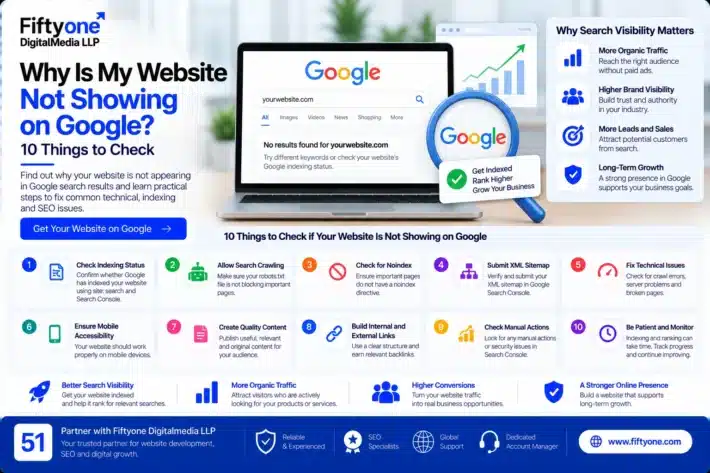
For example, your article about why a website is not showing on Google can provide useful context for readers investigating indexing problems.
Avoid adding links randomly or using the same keyword-rich anchor text everywhere. The goal is to help readers navigate your site and help search engines understand how the pages relate to one another.
Step 6: Check the XML sitemap
Confirm that the sitemap includes the correct, canonical URL for pages you want indexed.
Check that the page:
- Returns a successful response.
- Is not intentionally excluded from indexing.
- Uses the preferred URL format.
- Is not represented by an outdated URL after a migration.
Submitting a sitemap helps Google discover URLs, but it does not guarantee that those URLs will be indexed.
Step 7: Request indexing when appropriate
After making meaningful improvements, open URL Inspection and use Request Indexing for an important updated page when the option is available.
Avoid repeatedly submitting the same unchanged URL. Google does not guarantee that a request will result in indexing, and processing may take time.
Step 8: Monitor the result
Return to Search Console after allowing time for Google to process the page again.
Review the URL’s index status and look for changes in the Page indexing report. If the page remains excluded, reassess its content, canonical selection, internal links, and technical accessibility.
Do not assume that every page must be indexed. Some URLs, such as duplicate variations or low-value utility pages, may not need to appear in search results.
4. How to Fix the Issue in WordPress
If your website uses WordPress, several settings are worth checking.
Check WordPress search visibility
Go to Settings → Reading and review the option labelled “Discourage search engines from indexing this site.”
Make sure it is not enabled on a live website that should appear in Google. This setting is not the only factor affecting indexing, but it is an important configuration to verify.
Review your SEO plugin settings
If you use Yoast SEO, Rank Math, or another SEO plugin, open the affected page and review its indexing settings.
Check that the page is not accidentally set to noindex and that the canonical URL is correct.
Check your page template
Some WordPress themes, templates, and plugins can introduce unexpected metadata or display incomplete content.
Review the page source and test the live URL if you suspect a configuration problem.
Avoid unnecessary plugin changes
Do not deactivate plugins or change technical settings without evidence of a problem. Make a backup before making significant changes, and test important changes on a staging site where possible.
5. How Long Does It Take for Google to Index a Page?
There is no fixed timeline for indexing.
Google may process a page within days, or it may take longer. A page can remain outside the index even when it is accessible and technically eligible for indexing.
The important distinction is between being eligible for indexing and actually being indexed.
You can improve the page’s accessibility, usefulness, and discoverability, but you cannot force Google to include a URL.
If you recently published the page or made substantial changes, give Google time to recrawl and process it rather than submitting it repeatedly.
6. Common Mistakes to Avoid
When trying to fix this issue, avoid these common mistakes.
Repeatedly requesting indexing: Repeated requests without meaningful changes do not guarantee a different outcome.
Publishing more similar articles: Increasing content volume without adding distinct value may create more overlap instead of solving the problem.
Adding keywords unnaturally: Repeating the focus keyword does not compensate for incomplete or unhelpful content.
Changing canonical tags without investigation: An incorrect change can create additional indexing problems. Check the selected canonical before modifying it.
Expecting every URL to be indexed: Some pages should not be indexed, including duplicate versions and pages with no independent search value.
Ignoring internal links: Important pages should be connected to relevant content where it makes sense for users.
Assuming indexing guarantees rankings: An indexed page is eligible to appear in search results, but its visibility and position depend on additional factors.
7. Practical Checklist Before Requesting Indexing
Use this checklist for each important affected URL.
- The page loads correctly for visitors.
- Google can access the page.
- The page is not unintentionally marked
noindex. - The canonical URL is correct.
- The content satisfies the searcher’s intent.
- The page provides useful information beyond similar pages.
- Relevant internal links point to the page.
- The XML sitemap contains the correct URL where appropriate.
- No unexpected redirect or server issue affects the page.
- URL Inspection has been reviewed after the changes.
- An indexing request has been made only when appropriate.
- The page’s status will be monitored over time.
Use the checklist to prioritize important pages rather than making the same changes to every URL.
Frequently Asked Questions
Does “Crawled, currently not indexed” mean my page has an SEO error?
Not necessarily. It means Google has crawled the page but has not included it in its index. Review the content, canonical selection, technical settings, and internal linking to identify possible improvements.
Should I request indexing again?
Request indexing after meaningful changes when appropriate. Repeatedly submitting an unchanged page does not guarantee indexing.
Can thin content cause this status?
Low-value or incomplete content can contribute to a page not being selected for indexing. Improve the page by answering the searcher’s question clearly and adding useful, relevant information.
Can internal linking help?
Relevant internal links can help Google discover pages and understand their relationship to other content. They do not guarantee that a page will be indexed.
Should I delete pages that are not indexed?
Not automatically. First determine whether each page serves a useful purpose. Improve valuable pages, consolidate genuinely overlapping content when appropriate, and keep non-indexable utility or duplicate URLs out of the index when that is the intended outcome.
Will fixing the issue improve my rankings?
It may make a page eligible to appear in search results if indexing was the obstacle, but indexing does not guarantee rankings or traffic.
Conclusion
The “Crawled, currently not indexed” status in Google Search Console does not always indicate a technical error. It means Google has crawled the page but has not added it to the search index at that time.
Start by inspecting the URL, checking its indexing settings and canonical, and reviewing whether the content offers clear value to the intended audience. Then improve relevant internal linking, confirm sitemap accuracy, and request indexing when appropriate.
Avoid repeated submissions and unnecessary technical changes. Focus on the pages that matter most, make evidence-based improvements, and monitor the results over time.
About Fiftyone Digitalmedia LLP
Fiftyone Digitalmedia LLP helps businesses improve their websites through website development, technical SEO, and digital solutions. A structured review of indexing issues can help identify potential barriers to organic search visibility and prioritize the next steps.