WordPress Developer Skills Test: 7 Practical Tasks Before Hiring

Hiring a WordPress developer based only on a portfolio or interview answers is a risky decision. A developer may show impressive websites but still struggle with plugin conflicts, responsive design issues, website performance, or troubleshooting.
Before hiring, give the candidate a small practical assessment based on the type of work your business actually needs. This helps you evaluate technical ability, problem-solving, communication, and code quality before committing to a long-term arrangement.
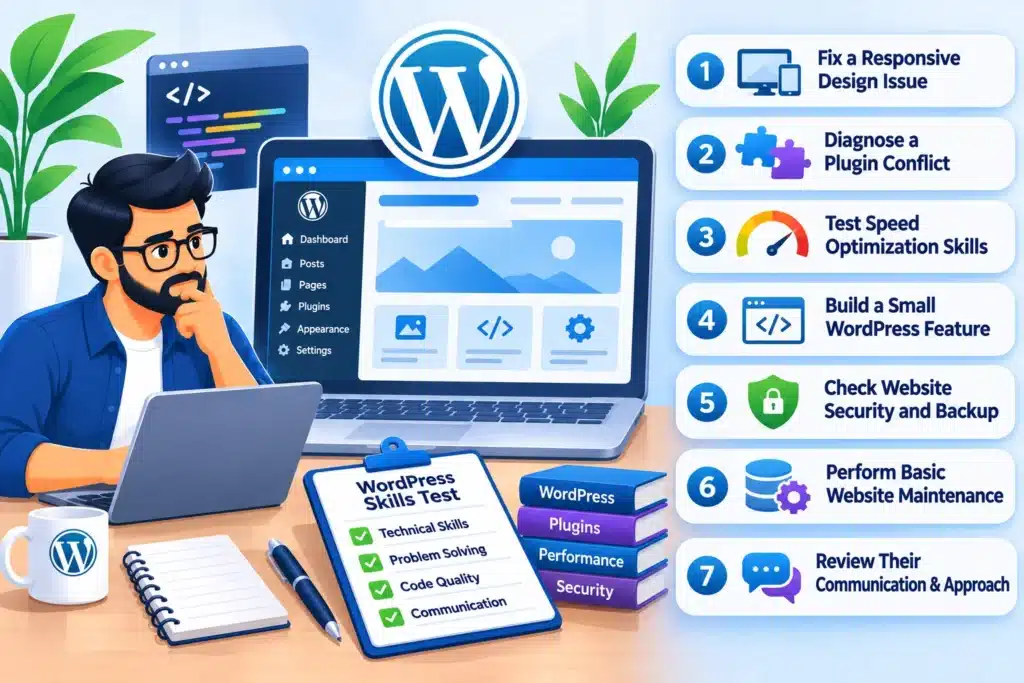
You do not need a complicated coding examination. Seven focused tasks can reveal whether a WordPress developer can handle real website problems.
Why Should You Test a WordPress Developer Before Hiring?
WordPress development involves more than installing themes and arranging page-builder elements. Depending on your requirements, a developer may need to work with custom CSS, PHP, plugins, databases, APIs, security settings, and performance optimization.
A weak hiring decision can lead to:
- Broken website layouts after small changes.
- Plugin conflicts and unexpected errors.
- Poor mobile responsiveness.
- Slow-loading pages.
- Security and backup problems.
- Unnecessary changes to existing functionality.
- Difficulties maintaining the website after delivery.
A practical assessment gives you evidence of how a developer works instead of relying entirely on what they say during an interview.
7 Practical Tasks to Test a WordPress Developer
Use tasks that reflect your actual project requirements. You do not need to assign all seven tasks as a single unpaid examination. Select a reasonable combination, agree on the time required, and compensate candidates for substantial work.
1. Ask Them to Fix a Responsive Design Issue
Give the developer a test page with a layout problem on mobile devices.
For example, you could provide a page where:
- Two columns overlap on mobile.
- Text extends outside its container.
- Images appear stretched.
- Buttons are difficult to tap.
- Sections have inconsistent spacing.
- A navigation menu does not display correctly.
Ask the candidate to identify the cause and correct the layout without damaging the desktop version.
What to evaluate:
- Does the developer understand CSS Flexbox and Grid?
- Can they use media queries correctly?
- Do they check different screen sizes?
- Do they preserve the original design?
- Do they avoid unnecessary CSS overrides?
A capable developer should fix the actual layout problem rather than hide it with random margins or fixed widths.
2. Give Them a Plugin Conflict to Diagnose
Plugin conflicts are common in WordPress websites, especially when several plugins control similar features.
Create a staging environment with a controlled issue, such as a form that stops working after a plugin update or a page element that disappears when a specific plugin is activated.
Ask the developer to investigate the problem and explain the cause.
What to evaluate:
- Do they test plugins systematically?
- Can they identify JavaScript or PHP errors?
- Do they check compatibility and plugin versions?
- Can they isolate the conflicting component?
- Do they explain the fix before changing the website?
Do not judge the developer only by whether the feature starts working. Their troubleshooting process matters because careless fixes can create additional problems.
3. Test Their WordPress Speed Optimization Skills
Give the candidate a page with identifiable performance issues, such as oversized images, unnecessary scripts, excessive animations, or poorly configured caching.
Ask them to review the page and recommend improvements.
They should be able to explain which changes are likely to improve performance and which changes could affect functionality.
Evaluate whether they understand:
- Image compression and appropriate image dimensions.
- Browser and page caching.
- CSS and JavaScript optimization.
- Unnecessary plugin resources.
- Font loading.
- Server response and database-related issues.
You can use Google PageSpeed Insights to establish a baseline before the test and compare the results afterward.
Do not accept a higher performance score as the only measure of success. The website must still work correctly.
For a more detailed understanding of website performance, see our guide on how to fix a slow WordPress website without changing hosting.
4. Ask Them to Build a Small WordPress Feature
A developer should be able to implement functionality, not just arrange existing page elements.
Give the candidate a small requirement that matches your website. Examples include:
- Creating a custom post type.
- Adding a custom field to a page.
- Building a simple enquiry form.
- Displaying selected posts in a custom layout.
- Creating a reusable section or template.
- Adding a small WooCommerce customization.
Keep the assignment limited. You are testing the developer’s approach, not asking them to build an entire website for free.
What to evaluate:
- Is the feature implemented correctly?
- Is the code organized and maintainable?
- Does the developer use suitable WordPress hooks or APIs?
- Are user inputs handled safely?
- Does the feature work on mobile devices?
- Can another developer understand the implementation?
If your project mainly uses Elementor or another page builder, include a task involving that specific tool. Do not test candidates on technologies your project does not require.
5. Check Their Website Security and Backup Knowledge
A WordPress developer should understand how to protect a website while making changes.
Ask the candidate to explain how they would prepare a website before installing a new plugin, updating a theme, or changing important functionality.
A sensible process should include:
- Creating a complete backup.
- Using a staging environment where possible.
- Checking plugin and theme compatibility.
- Limiting user permissions.
- Protecting administrator credentials.
- Avoiding unnecessary changes to core WordPress files.
- Testing important functionality after updates.
You can also ask how they would investigate suspicious administrator accounts or an unexpected file change.
Do not provide unrestricted access to your live website during a hiring test. Use a separate staging installation with limited permissions.
6. Give Them a Website Bug to Investigate
Real development work often involves investigating problems that do not have an obvious solution.
Provide a controlled issue, such as:
- A contact form that does not send submissions.
- A broken navigation link.
- A page that displays incorrectly in one browser.
- A WooCommerce button that does not respond.
- A layout that breaks after content is updated.
Ask the candidate to investigate the issue, identify the likely cause, and explain the proposed solution.
What to evaluate:
- Do they ask relevant questions?
- Do they reproduce the issue before editing anything?
- Can they use browser developer tools?
- Do they check error logs when necessary?
- Do they test the solution after implementation?
A developer who immediately changes several files without understanding the problem is creating unnecessary risk.
7. Review Their Documentation and Handover Process
Technical ability is not enough if the developer cannot explain what they changed.
After completing the practical assessment, ask for a short handover document containing:
- The original problem.
- The changes implemented.
- The files, plugins, or settings affected.
- Any custom code added.
- Tests performed.
- Known limitations or remaining issues.
- Instructions for maintaining the feature.
This is particularly important when hiring a remote developer or working with an external development team.
A clear handover reduces dependency on one individual and makes future maintenance easier.
How to Score a WordPress Developer’s Practical Test
Use a simple scorecard to compare candidates consistently. Give each area a score from 1 to 5.
| Evaluation Area | What You Should Check |
|---|---|
| Technical skills | Can they complete the assigned task correctly? |
| Problem-solving | Do they investigate the root cause? |
| Responsive design | Does the solution work across screen sizes? |
| Performance | Do they understand optimization trade-offs? |
| Security | Do they follow safe development practices? |
| Code quality | Is the implementation organized and maintainable? |
| Communication | Can they explain progress and technical decisions? |
Suggested evaluation:
- 30–35: Strong candidate for further evaluation.
- 23–29: Consider them if their weaknesses are not critical to your project.
- Below 23: Do not hire without further technical assessment.
These are internal evaluation guidelines, not industry-standard hiring benchmarks. Adjust the criteria according to the responsibilities of the role.
For example, a developer hired mainly for Elementor landing pages should be evaluated differently from someone responsible for custom plugins, WooCommerce functionality, and backend development.
What Should You Avoid During a WordPress Developer Test?
A poorly designed hiring assessment can produce misleading results.
Avoid these mistakes:
Assigning a complete website as an unpaid test: A full website is a commercial deliverable, not a reasonable screening exercise. Use a small task or pay for a larger assessment.
Testing irrelevant technologies: If your project uses WordPress and WooCommerce, spending most of the assessment on an unrelated framework does not help you select the right candidate.
Providing live website access: Use staging websites and restricted permissions. Never expose customer information, payment data, or sensitive credentials unnecessarily.
Judging only by completion speed: Fast work is not useful if it introduces errors or creates maintenance problems.
Ignoring communication: A developer should be able to explain blockers, technical decisions, and changes clearly.
Skipping final testing: Always check the completed work on relevant devices, browsers, and user journeys.How to Choose the Right WordPress Developer After Testing
Once the assessment is complete, compare the candidate’s results against your actual project needs.
A developer who performs well on a small landing-page task may not automatically be suitable for a complex WooCommerce store or a custom WordPress application.
Before making the final decision, confirm:
- Their experience with your required WordPress tools.
- Their availability and expected working hours.
- Their responsibilities and deliverables.
- Their communication and reporting process.
- Their payment terms.
- Their code and intellectual property handover arrangements.
- Their availability for future maintenance, if required.
If your website needs ongoing customization, integrations, or advanced functionality, review the scope of your custom WordPress development requirements before selecting a developer.
Fiftyone Digitalmedia LLP provides website development support for businesses that need WordPress development and related technical services. The right engagement should be based on your project scope, technical requirements, and expected level of support.
Frequently Asked Questions
How can I test a WordPress developer before hiring?
Give the candidate a small practical task involving responsive design, troubleshooting, performance optimization, or a WordPress feature. Review the final result, code quality, testing process, and communication.
What skills should a professional WordPress developer have?
The required skills depend on the role. Common requirements include WordPress administration, themes, plugins, HTML, CSS, JavaScript, PHP, responsive design, security, backups, and troubleshooting.
Should I give a WordPress developer a paid test task?
For a small screening exercise, a limited assessment may be sufficient. If the assignment requires substantial development work or produces something your business will use, agree on payment and ownership terms in advance.
How long should a WordPress developer assessment take?
A focused assessment can take a few hours, depending on the task. A complex assignment may require more time and should be treated as paid work rather than an unpaid interview exercise.
Is Elementor experience enough to become a WordPress developer?
Elementor experience is useful for building and managing page layouts, but it does not cover every WordPress development requirement. Projects involving custom functionality, PHP, plugin development, integrations, or advanced troubleshooting may require additional technical skills.
Conclusion
Hiring a WordPress developer without testing their practical skills can create avoidable technical and financial problems. A portfolio shows previous work, but a focused assessment shows how a candidate approaches real development tasks.
Test responsive design, plugin troubleshooting, website performance, custom functionality, security, bug investigation, and documentation. Use a staging environment, define clear expectations, and evaluate candidates against the actual requirements of your website.
The objective is not to find someone who can simply make a WordPress page look good. It is to hire a developer who can build, troubleshoot, maintain, and improve your website without creating unnecessary technical risks.