WordPress vs Shopify for Small Business in 2026: Cost, Speed, and Control
Choosing between WordPress and Shopify is not just a design decision. It affects your website’s running costs, ecommerce operations, flexibility, maintenance requirements and ability to grow.
WordPress with WooCommerce is generally better for businesses that need content flexibility, custom functionality and greater control. Shopify is generally better for businesses that want to launch and manage an online store with less technical maintenance.
Neither platform is automatically cheaper or better. The right choice depends on what your business sells, how you plan to attract customers and who will manage the website.
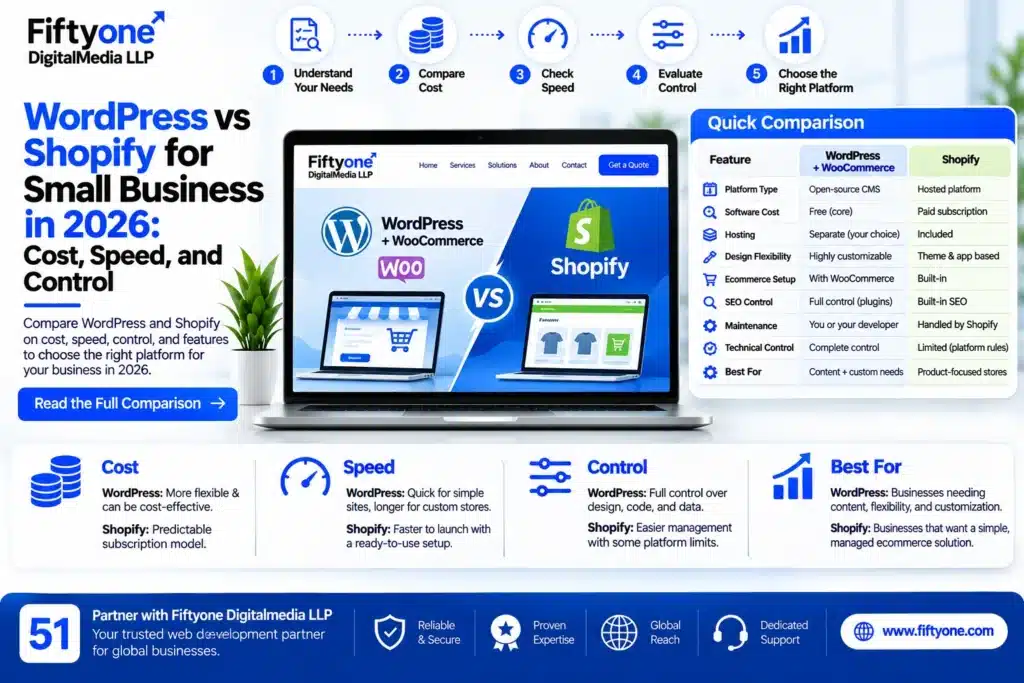
WordPress vs Shopify: Quick Comparison
| Feature | WordPress + WooCommerce | Shopify |
|---|---|---|
| Platform type | Open-source CMS with ecommerce plugin | Hosted ecommerce platform |
| Initial software cost | WordPress and WooCommerce core are free | Paid subscription |
| Hosting | Purchased separately | Included |
| Design flexibility | Extensive customisation | Theme and app-based customisation |
| Ecommerce | Requires WooCommerce setup | Built-in ecommerce |
| SEO flexibility | Extensive control through plugins and configuration | Built-in SEO features |
| Maintenance | Managed by you or your developer | Platform maintenance handled by Shopify |
| Plugin and app costs | Free and paid plugins | Free and paid apps |
| Technical control | Greater control over code and hosting | More platform restrictions |
| Best suited for | Content-led businesses and custom websites | Product-focused online stores |
The comparison here is between self-hosted WordPress.org with WooCommerce and Shopify. WordPress.com is a separate hosted service with different plans and limitations.
1. What Is the Difference Between WordPress and Shopify?
Before comparing costs and features, understand that these platforms work differently.
WordPress with WooCommerce
WordPress is an open-source content management system. You can use it to create business websites, blogs, portfolios, landing pages and ecommerce stores.
To sell products through WordPress, you can install WooCommerce, an ecommerce plugin that adds features such as:
- Product listings and categories
- Shopping carts
- Checkout functionality
- Payment gateway integrations
- Shipping options
- Inventory management
- Order management
- Discount coupons
You select your hosting provider, theme, plugins and website configuration. This gives you greater control, but you are also responsible for maintaining the technical setup.
Shopify
Shopify is a hosted ecommerce platform designed to help businesses create and manage online stores.
It provides a central dashboard for managing products, orders, payments, shipping settings and store operations.
Its main features include:
- Online store creation
- Product and inventory management
- Checkout functionality
- Payment integrations
- Order management
- Discount codes
- Ecommerce themes
- App integrations
- Hosting and platform security features
You do not need to purchase separate hosting or manage the underlying server yourself.
2. WordPress vs Shopify: Which Is More Affordable?
Cost is one of the biggest factors for small businesses. However, comparing only the software price gives an incomplete picture.
WordPress software is free, but running a professional website involves hosting, a domain, themes, plugins, development and maintenance.
Shopify uses a subscription model. Its monthly plan provides access to the hosted ecommerce platform, but additional apps, themes, payment processing and development work can increase the total cost.
WordPress cost components
| Expense | What You May Need |
|---|---|
| WordPress software | Free |
| WooCommerce plugin | Free core plugin |
| Domain | Paid registration and renewal |
| Hosting | Depends on provider and server requirements |
| Theme | Free or paid |
| Plugins | Free or paid |
| Development | Depends on customisation |
| Maintenance | Depends on who manages the website |
Shopify cost components
| Expense | What You May Need |
|---|---|
| Shopify subscription | Monthly or annual plan |
| Domain | Free platform subdomain or purchased custom domain |
| Theme | Free or paid |
| Apps | Free or paid subscriptions |
| Payment processing | Depends on payment provider and plan |
| Custom development | Depends on requirements |
| Additional services | Marketing, shipping and other integrations |
Which is cheaper?
WordPress can be more cost-effective when you have technical support, suitable hosting and a manageable plugin setup. Shopify can be more predictable for businesses that prefer a bundled platform and want to avoid managing hosting.
For a fair comparison, calculate the total cost over at least 12 months. Include setup, renewals, apps, payment processing, maintenance and future changes.
Do not assume WordPress is always cheaper or Shopify is always more expensive. The actual cost depends on your website requirements and operating model.
3. Which Platform Is Faster to Build?
The time required to launch a website depends on its design, features, content, product catalogue and integrations.
WordPress development time
A basic WordPress business website can be launched relatively quickly using a suitable theme or page builder.
However, an ecommerce website may require additional work, including:
- Installing and configuring WooCommerce
- Creating product categories
- Setting up payment gateways
- Configuring shipping methods
- Designing product and checkout pages
- Testing orders and notifications
- Configuring security and backups
Custom functionality and third-party integrations can increase development time.
Shopify development time
Shopify provides an ecommerce-focused setup, so businesses can start with a theme and configure their store through its dashboard.
Typical setup activities include:
- Selecting a theme
- Adding products
- Configuring payment methods
- Setting shipping rates
- Creating essential pages
- Connecting a custom domain
- Testing checkout and order management
Shopify can reduce the amount of technical setup required, particularly for standard online stores.
Verdict: Shopify is generally quicker for launching a standard ecommerce store. WordPress may take more configuration, especially when you need custom functionality or a content-heavy website.
4. Which Platform Gives You More Design and Customisation Control?
Your website may need more than a homepage, product listings and a contact page. You might require custom landing pages, advanced forms, membership features, booking systems or specialised integrations.
This is where platform flexibility becomes important.
WordPress customisation
WordPress gives you control over the website’s design, code, database, hosting environment and functionality.
You can use:
- Elementor and other page builders
- Custom WordPress themes
- Custom plugins
- WooCommerce extensions
- Custom post types
- Advanced forms
- API integrations
- Custom PHP, CSS and JavaScript
You can also modify the website’s structure and functionality according to your business requirements.
However, adding too many plugins without proper planning can create compatibility, performance and security problems.
Shopify customisation
Shopify provides theme customisation, app integrations and developer tools.
You can modify:
- Store layouts
- Product pages
- Collection pages
- Navigation
- Checkout-related settings available to your plan
- Product filters
- Store functionality through apps and custom development
Shopify is flexible enough for many ecommerce businesses, but you operate within its platform architecture and feature limitations.
Verdict: WordPress offers greater overall control. Shopify offers a more structured environment for businesses that do not need extensive technical customisation.
5. WordPress vs Shopify: Which Is Better for SEO?
Both platforms can support search engine optimisation. Neither platform automatically guarantees higher Google rankings.
SEO results depend on technical quality, useful content, website structure, page experience, backlinks and search intent.
WordPress SEO
WordPress offers extensive control over SEO-related settings.
You can work on:
- Custom page titles and meta descriptions
- XML sitemaps
- Schema markup
- URL structures
- Internal linking
- Image optimisation
- Redirects
- Technical SEO
- Blog content and category structures
SEO plugins such as Rank Math and Yoast SEO can help manage many of these tasks.
WordPress is particularly useful for businesses that depend on blogs, educational content, service pages and organic lead generation.
Shopify SEO
Shopify includes several SEO features for ecommerce websites.
You can manage:
- Page titles and meta descriptions
- Product and collection content
- Image alt text
- Canonical tags
- XML sitemaps
- Redirects
- Blog posts
- Basic structured data through themes and apps
However, some URL structures are controlled by Shopify, and businesses may have less flexibility over certain technical aspects than with self-hosted WordPress.
Verdict: WordPress offers more control for advanced content and technical SEO. Shopify provides useful built-in SEO capabilities for product-focused stores. A properly configured website on either platform can perform well in search results.
6. Which Platform Is Easier to Maintain?
A website is not finished when it goes live. It needs regular updates, monitoring, backups and security checks.
WordPress maintenance
With self-hosted WordPress, you or your developer must manage:
- WordPress core updates
- Theme updates
- Plugin updates
- Website backups
- Security monitoring
- Malware checks
- Hosting performance
- Database optimisation
- Compatibility testing
Poor maintenance can lead to broken features, security vulnerabilities and performance issues.
Shopify maintenance
Shopify manages the underlying hosting infrastructure and platform updates.
You still need to maintain:
- Store content
- Product information
- Theme customisations
- Installed apps
- Payment and shipping settings
- Customer and order workflows
- Store policies and compliance requirements
Shopify reduces infrastructure maintenance, but it does not eliminate all store-management responsibilities.
Verdict: Shopify generally requires less technical maintenance. WordPress provides more control but requires a clear maintenance process.
7. Which Platform Is Better for Different Small Businesses?
The best platform depends on how your business operates.
| Business Type | Recommended Platform | Reason |
|---|---|---|
| Local service business | WordPress | Flexible service pages, forms and local SEO |
| Consultant or freelancer | WordPress | Portfolio, blogs and lead generation |
| Small clothing brand | Shopify | Product and order management |
| Online cosmetics store | Shopify | Store-focused features |
| Content-driven business | WordPress | Greater publishing flexibility |
| Business with custom workflows | WordPress | More control over development |
| New product-focused ecommerce brand | Shopify | Managed ecommerce setup |
| Business with a small online shop and many service pages | WordPress + WooCommerce | Combines content and ecommerce |
If you are planning a product-based ecommerce store, also evaluate your catalogue size, shipping requirements, payment providers and inventory workflow before selecting a platform.
For businesses planning a custom ecommerce project, professional Shopify and ecommerce website development services can help evaluate the required features and implementation approach.
8. WordPress vs Shopify: What About Speed and Website Performance?
Website speed affects user experience and can contribute to search performance. However, neither platform guarantees a fast website automatically.
WordPress performance
WordPress performance depends on:
- Hosting quality
- Theme structure
- Plugin selection
- Image sizes
- Caching configuration
- Database performance
- JavaScript and CSS loading
- CDN configuration
A lightweight WordPress website with suitable hosting and optimisation can perform well. A website overloaded with plugins, scripts and large images can become slow.
Shopify performance
Shopify manages its hosting infrastructure and provides a hosted environment for online stores.
However, performance can still be affected by:
- Heavy themes
- Too many third-party apps
- Large product images
- Unnecessary scripts
- Tracking tools
- Custom code
Verdict: Shopify reduces server-management responsibilities, while WordPress provides more control over performance configuration. Actual speed depends on implementation, not just the platform name.
If you use WooCommerce, checkout reliability is also important. Review common WooCommerce checkout errors and how to fix them before launching an online store.
9. Can You Switch from WordPress to Shopify or Shopify to WordPress Later?
Yes, migration is possible, but it is not always a simple one-click process.
When moving between platforms, you may need to transfer:
- Products
- Product descriptions
- Product images
- Customer records
- Order history
- Blog posts
- Pages
- Categories
- Redirects
- SEO metadata
Your existing design usually needs to be rebuilt because WordPress themes and Shopify themes are not directly interchangeable.
You should also check URL changes. Incorrect migration can create broken links, duplicate pages and loss of organic search traffic.
Before migration, prepare a complete backup, map old URLs to new URLs, test important pages and verify checkout functionality.
If your existing website generates enquiries or sales, do not migrate without a testing and redirect plan.
10. Final Decision: Should Your Small Business Choose WordPress or Shopify?
Use this decision guide before committing to a platform.
Choose WordPress with WooCommerce if:
- Your website needs extensive content and blogging.
- You want greater control over design and functionality.
- You need custom integrations or workflows.
- You want control over hosting and website files.
- You have access to someone who can maintain the website.
Choose Shopify if:
- Your primary business activity is selling products online.
- You want a managed ecommerce platform.
- You prefer not to manage hosting and server updates.
- You need a central dashboard for store operations.
- Your requirements fit Shopify’s themes, features and apps.
The wrong decision is choosing a platform only because someone says it is cheaper, faster or better for SEO. First define your business requirements, expected operating costs and long-term plans.
Frequently Asked Questions
1. Is WordPress better than Shopify for small businesses?
WordPress is generally better for service businesses, content-led websites and projects requiring extensive customisation. Shopify is generally better for businesses focused on selling products through an online store.
2. Is WordPress cheaper than Shopify?
WordPress software and WooCommerce’s core plugin are free, but hosting, domains, premium plugins, development and maintenance can add costs. Shopify requires a subscription and may involve additional app and payment costs. Compare the complete annual cost rather than only the starting price.
3. Is Shopify easier to use than WordPress?
For standard ecommerce operations, Shopify is generally easier because hosting, store management and many ecommerce features are integrated. WordPress offers more flexibility but requires more configuration and maintenance.
4. Which platform is better for SEO in 2026?
Both platforms support SEO. WordPress offers greater flexibility for content management and technical optimisation, while Shopify provides built-in SEO features for ecommerce stores. Rankings depend on the quality and implementation of your SEO strategy.
5. Can I use WooCommerce instead of Shopify?
Yes. WooCommerce adds ecommerce functionality to WordPress. It supports product management, payments, shipping and order management, while allowing you to control your hosting and website setup.
6. Can Shopify handle a growing ecommerce business?
Yes. Shopify offers plans and features designed for businesses at different stages of growth. However, you should evaluate subscription costs, app requirements, payment fees and the platform’s capabilities against your expected business needs.
7. Do I need a developer for WordPress or Shopify?
You can create a basic website on either platform without hiring a developer. However, custom designs, advanced integrations, performance optimisation, troubleshooting and migration may require professional development support.
Related Blogs
- Best Shopify and Ecommerce Development Company in India
- Best Ecommerce Website Developers in Indore
- WooCommerce Orders Not Working? How to Diagnose Failed Orders and Payments
Conclusion
WordPress and Shopify solve different business problems. WordPress is a strong choice when flexibility, content, custom development and website ownership matter most. Shopify is a practical choice when selling products online and reducing technical maintenance are the main priorities.
Before choosing, compare the total cost, required features, maintenance responsibilities and future growth plans. The right platform is the one that supports your actual business operations without creating unnecessary costs or technical complications.
Fiftyone Digitalmedia LLP helps businesses evaluate, design and develop websites based on their requirements, whether they need a WordPress website, WooCommerce store or Shopify ecommerce solution.