WordPress Malware Removal Guide: How to Clean and Secure a Hacked Website
A hacked WordPress website can cause much more than temporary downtime. Malware can inject spam pages, redirect visitors, create unauthorized administrator accounts, modify website files, damage search visibility, or expose sensitive information. Fiftyone Digitalmedia LLP helps businesses address WordPress security issues with a structured approach to website cleanup and protection.
The good news is that a compromised WordPress website can usually be recovered when the infection is handled systematically. The important part is not simply deleting suspicious files. You need to identify how the website was compromised, remove malicious code, close possible backdoors, secure accounts, update vulnerable software, and monitor the website after cleanup.
This WordPress Malware Removal Guide explains the process step by step so website owners, developers, and businesses can understand what to do when their WordPress website shows signs of malware.
1. How to Know Your WordPress Website Has Malware
Not every WordPress problem is caused by malware. A broken plugin, incorrect configuration, hosting problem, or failed update can also make a website behave unexpectedly.
However, several warning signs should immediately attract attention.
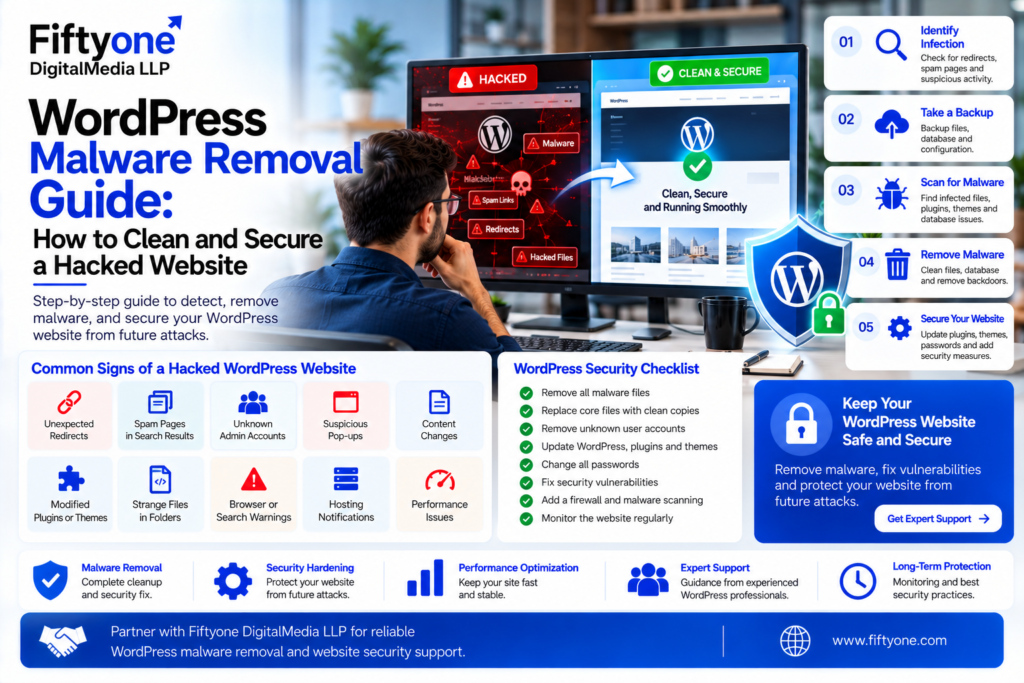
Common symptoms include:
- Unexpected redirects to unfamiliar websites
- Spam pages appearing in Google search results
- Unknown administrator accounts
- Suspicious pop-ups or advertisements
- Homepage content changing without permission
- Plugins or themes becoming modified
- Unusual PHP files appearing in WordPress folders
- Website warnings from browsers or search engines
- Hosting account notifications about malicious activity
- Sudden performance problems or unexplained server resource usage
Sometimes the website may look completely normal to the administrator while malicious code operates in the background. That is why visual inspection alone is not enough.
Security scanners can identify suspicious files and publicly visible malicious content, while server-side investigation may reveal backdoors or infections that a normal browser cannot see.
2. Take a Backup Before Removing Malware
Before changing files or database records, create a complete backup of the compromised website.
This should include both:
| Backup Component | What It Contains | Why It Matters |
|---|---|---|
| WordPress Files | Themes, plugins, uploads and core files | Helps restore or compare files |
| Database | Posts, pages, users, settings and configuration | Preserves website content |
| wp-config.php | Database and WordPress configuration | Important for recovery |
| Hosting Configuration | Server-level settings where applicable | Helps restore the environment |
Do not assume that an existing backup is automatically clean. If the malware has been present for several weeks, older backups may also contain malicious code.
A known-clean backup can be extremely valuable because it allows you to compare the current website with an earlier healthy version. In some situations, restoring from a verified clean backup is faster than manually cleaning thousands of infected files.
If you are unfamiliar with FTP, SSH, PHP, or database administration, avoid making large-scale changes without a reliable backup or professional assistance.
3. Scan WordPress for Malware
The next step is to determine what has been compromised.
Start with a reputable malware scanner and perform a complete scan. Look for suspicious files, injected scripts, malicious redirects, spam links, modified WordPress files, and unexpected administrator accounts.
A useful investigation should examine:
WordPress Core Files
Compare core WordPress files against clean copies of the same WordPress version. Unexpected modifications can indicate an infection.
Plugins and Themes
Outdated, abandoned, nulled, or vulnerable plugins and themes can become entry points for attackers. Check recently modified files and compare them with clean versions.
Uploads Folder
The wp-content/uploads directory normally contains media files, but attackers may sometimes place malicious scripts in writable directories.
Database
Malware may also exist inside the database. Look for unexpected administrator accounts, injected JavaScript, spam content, malicious URLs, and suspicious changes to settings or posts.
User Accounts
Review administrator and other privileged accounts. Remove accounts that you cannot identify or no longer need.
A website can remain infected even after visible malicious files are deleted if an attacker has left another method of access behind.
4. Remove Malware From WordPress Files
After identifying infected files, begin the cleanup carefully.
For WordPress core files, replacing compromised files with clean copies from the appropriate official WordPress release is generally safer than manually editing every core file. However, important configuration and content directories require special care. Security guidance recommends avoiding accidental replacement of wp-config.php and wp-content when restoring WordPress core files.
For plugins and themes, replace compromised components with clean copies from trusted sources. If a plugin or theme contains custom modifications, make sure those changes are preserved before replacement.
Do not blindly delete code simply because a function looks suspicious. Functions such as eval, base64_decode, or other encoding-related functions can have legitimate uses in some software. The surrounding code and file context need to be investigated before removal.
Also check for unfamiliar files with names designed to resemble legitimate WordPress files. Attackers sometimes place backdoors in unexpected directories or modify existing files.
5. Clean the WordPress Database
Malware is not always stored in website files.
Attackers can inject malicious content into WordPress database tables, including posts, pages, options, user records, widgets, and other configuration data.
Common database indicators include:
- Unknown administrator accounts
- Spam posts or pages
- Unexpected external links
- Malicious JavaScript
- Suspicious redirects
- Strange values inside configuration options
- Unrecognized website content
Always create a database backup before editing database records.
If you discover large amounts of injected database content, avoid performing broad SQL operations unless you understand exactly what they will change. Incorrect database modifications can permanently damage legitimate website content.
For larger infections, database cleanup should be performed by someone experienced with WordPress databases and malware analysis.
6. Remove Backdoors and Secure User Access
Removing the visible malware is only part of the job.
A backdoor can allow an attacker to return after the website appears clean. Security investigations commonly look for hidden access mechanisms in WordPress files, themes, plugins, uploads, configuration files, and user accounts.
Review all possible access points:
- WordPress administrator accounts
- Hosting control-panel accounts
- FTP/SFTP accounts
- SSH accounts
- Database users
- Email accounts connected to the hosting environment
Change passwords after the infection has been addressed and use strong, unique credentials.
Enable multi-factor authentication wherever available. WordPress security hardening can also include limiting login attempts, restricting administrative access, and using appropriate firewall protection.
If multiple websites share the same hosting environment, inspect them as well. Cross-site contamination can cause a cleaned website to become infected again.
7. Update WordPress and Harden the Website
Once the malware has been removed, the next priority is preventing reinfection.
Update:
- WordPress core
- Plugins
- Themes
- PHP and server software where appropriate
- Other third-party components
Remove plugins and themes that are no longer required. Unused software increases the number of components that need to be maintained and secured.
A practical post-cleanup security setup should include:
| Security Measure | Purpose |
|---|---|
| Strong passwords | Reduces account compromise |
| 2FA/MFA | Adds another authentication layer |
| Regular updates | Fixes known vulnerabilities |
| Security scanning | Detects suspicious changes |
| Firewall | Helps block malicious traffic |
| Automated backups | Provides recovery options |
| Least-privilege access | Limits account permissions |
| Activity monitoring | Helps identify unusual behavior |
Website owners should also review hosting security and isolate websites where possible. Keeping several unrelated websites in one environment can increase the risk of cross-site contamination.
For businesses that need a more secure WordPress setup, WordPress Website Development Services can also be useful when reviewing development, performance, maintenance, and security requirements.
8. Check Google Warnings and Monitor the Website
Cleaning the malware does not necessarily mean the recovery process is finished.
If Google or another security provider has flagged the website, the warning may continue until the website has been reviewed and the appropriate reconsideration or review process has been completed.
After cleaning, check:
- Google Search Console
- Indexed pages
- Search results for spam URLs
- Browser security warnings
- Website redirects
- Server error logs
- WordPress administrator accounts
- File modification activity
- Website performance
- Security scanner results
Continue monitoring the website for suspicious activity.
If malicious content returns shortly after cleanup, assume that the original entry point or a backdoor may still exist rather than repeatedly deleting the visible infection.
WordPress Malware Removal: Manual Cleanup vs Professional Help
Not every malware infection requires the same level of expertise.
| Situation | Recommended Approach |
|---|---|
| One suspicious plugin | Replace or remove the plugin |
| Outdated WordPress installation | Update after creating a backup |
| Spam pages in database | Investigate database and user activity |
| Multiple modified files | Perform a complete security investigation |
| Unknown admin accounts | Review and secure all accounts |
| Hidden backdoor suspected | Professional malware analysis recommended |
| Search engine blacklist | Clean, harden and request a security review |
| Repeated reinfection | Investigate hosting and original entry point |
For a small website with a simple infection, an experienced administrator may be able to complete the cleanup.
For an ecommerce website, business-critical website, or site containing sensitive information, professional malware removal can reduce the risk of accidental data loss and incomplete cleanup.
Fiftyone Digitalmedia LLP can support businesses with WordPress development, maintenance, security hardening, performance optimization, and technical website support.
Frequently Asked Questions
1. Can WordPress malware be removed completely?
Yes, many WordPress malware infections can be removed completely. However, successful cleanup requires more than deleting visible malicious files. The original vulnerability, compromised accounts, backdoors, database injections, and outdated software should also be investigated.
2. Should I delete my entire WordPress website if it is hacked?
Not necessarily. Deleting the entire website may cause unnecessary data loss. If a verified clean backup is available, restoring it may be a faster recovery option. Otherwise, the infected files and database should be investigated and cleaned carefully.
3. How long does WordPress malware removal take?
The time depends on the size and complexity of the infection. A simple compromised plugin may be resolved relatively quickly, while a website with thousands of modified files, database injections, or multiple backdoors can require significantly more investigation.
4. Can a WordPress security plugin remove all malware?
Security plugins can be useful for scanning, monitoring, and identifying suspicious activity, but no single automated tool should be assumed to detect every possible infection. Server-side files, databases, accounts, and hosting configuration may also require investigation.
5. Why does WordPress get infected again after cleaning?
Repeated reinfection often indicates that the original vulnerability or a hidden backdoor has not been removed. Outdated plugins, compromised passwords, infected neighboring websites, or insecure hosting configurations can also contribute to reinfection.
6. Can malware affect WordPress SEO?
Yes. Malware can create spam pages, redirects, unwanted links, or deceptive content that can damage search visibility and user trust. If a search engine has flagged the website, the site should be cleaned before requesting a review.
7. Should I hire a professional for WordPress malware removal?
Professional assistance is recommended when the infection affects many files, the database has been modified, the website repeatedly becomes infected, administrator access has been compromised, or the website is critical to business operations.
Conclusion
WordPress malware removal should be treated as a complete security recovery process rather than simply deleting suspicious code.
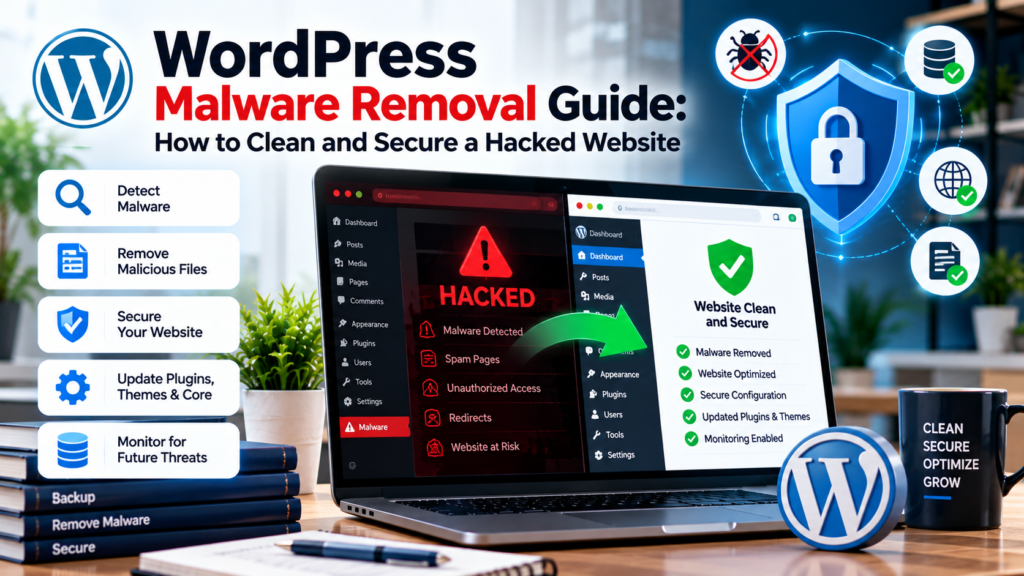
Start with a reliable backup, identify the infection, scan files and databases, replace compromised components with clean versions, remove unauthorized access, investigate backdoors, update vulnerable software, and strengthen the website before returning to normal operations.
The most important objective is not just to make the website look clean again. It is to understand how the compromise happened and close the path that allowed the attacker to enter.
Fiftyone Digitalmedia LLP helps businesses maintain secure, scalable, and professionally developed WordPress websites with ongoing technical support and security-focused development practices.
A properly cleaned and hardened WordPress website is far less likely to become a recurring security problem when updates, backups, monitoring, and access controls are maintained consistently.
SEO Metadata
Meta Title: WordPress Malware Removal Guide | Clean a Hacked Site
Meta Description: Learn how to remove malware from WordPress, clean infected files and databases, remove backdoors, secure accounts, and prevent future WordPress infections.
Focus Keyphrase: WordPress Malware Removal
Secondary Keywords: WordPress malware removal guide, remove malware from WordPress, hacked WordPress website, WordPress malware cleanup, WordPress security, WordPress hacked site recovery, WordPress malware detection, WordPress security hardening
SEO Tags: WordPress Malware Removal, WordPress Security, WordPress Malware, Hacked WordPress, WordPress Security Guide, Malware Cleanup, WordPress Website Security, WordPress Maintenance, Website Malware Removal, WordPress Protection