Why Is My Shopify Store Slow?
Introduction
A slow Shopify store can frustrate shoppers before they even view a product. Pages may take too long to load, product images may appear late, or buttons may respond slowly when customers try to browse or add items to their cart. These issues can make shopping less convenient and create unnecessary friction in the buying journey.
If you are wondering, “Why is my Shopify store slow?”, the cause may not be Shopify hosting itself. Themes, installed apps, large media files, custom code, tracking scripts, and complex page layouts can all affect storefront performance. Shopify already provides infrastructure-level optimizations, so adding more speed apps or changing settings without investigating the actual issue may not solve the problem.
The better approach is to measure your store’s performance, identify the main bottlenecks, and prioritize fixes that improve the customer experience without removing features your business needs.
How to Check Shopify Store Speed
Before making changes, establish how your store performs and which pages need attention. Start with your homepage, a popular product page, and a collection page. These pages often represent important steps in the customer journey.
Use Google PageSpeed Insights to inspect individual URLs and identify performance opportunities. You can also review Shopify’s Web Performance reports to understand how real visitors experience your store.
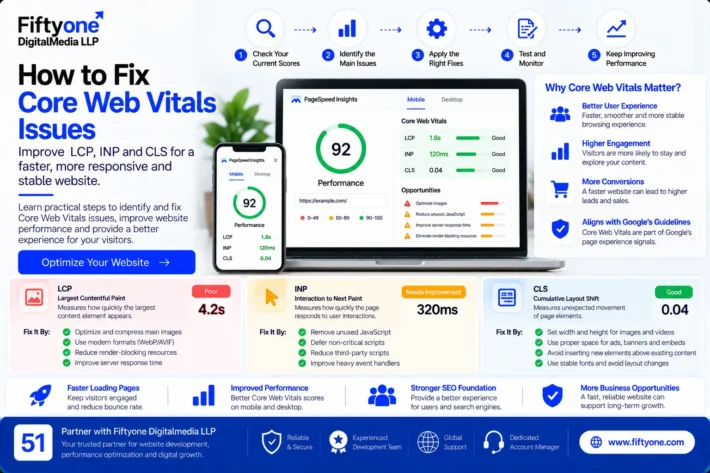
Pay attention to three Core Web Vitals:
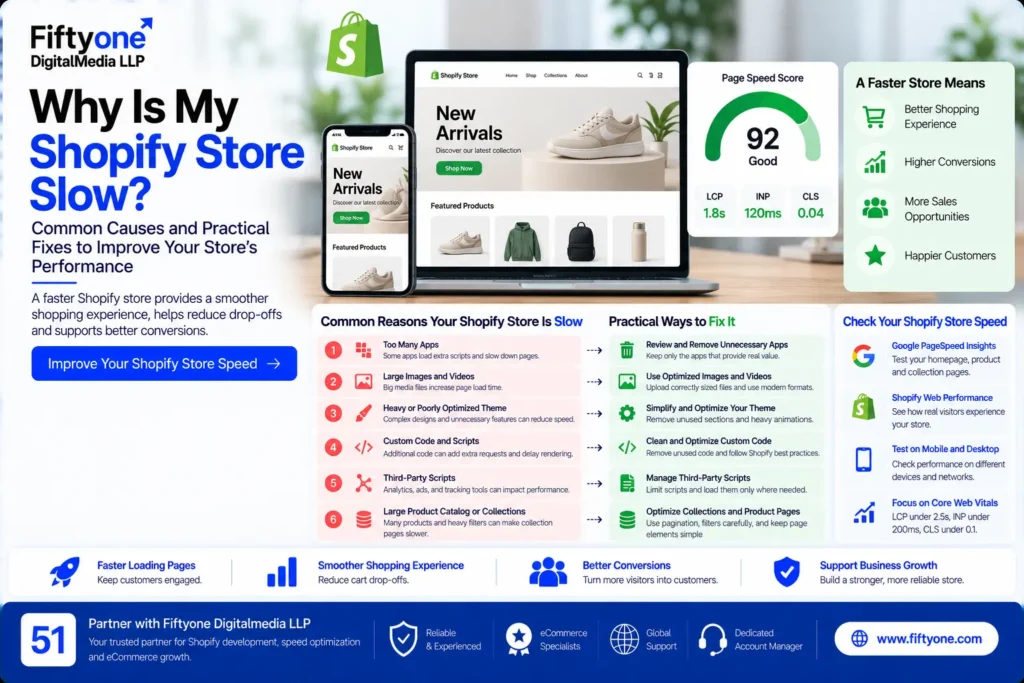
- Largest Contentful Paint (LCP): Measures how quickly the main content becomes visible. A good result is 2.5 seconds or less.
- Interaction to Next Paint (INP): Measures how quickly a page responds to user interactions. A good result is 200 milliseconds or less.
- Cumulative Layout Shift (CLS): Measures unexpected movement of page elements. A good result is 0.1 or less.
These are recommended thresholds, not guarantees of rankings or sales. Shopify explains how these metrics work in its online store performance documentation.
Test both mobile and desktop. A store may appear fast on a powerful computer but feel slow on a mobile device with a weaker processor or slower connection.
1. Too Many Shopify Apps
Shopify apps can add useful features such as product reviews, customer support chat, upselling, subscriptions, analytics, and email marketing. However, some apps load additional JavaScript, CSS, or external resources on storefront pages.
The problem is not simply the number of apps installed. It is how each app affects the pages where it runs.
How to fix it:
- Review the apps currently installed and identify which ones provide measurable business value.
- Remove apps that are unused, duplicated, or no longer needed.
- Check whether an app loads scripts on every page when it only needs to work on selected pages.
- Review recently installed apps if performance became worse after a change.
- Follow the developer’s instructions to remove leftover code when uninstalling an app.
Do not uninstall essential apps just to improve a performance score. First confirm their purpose and test any changes in a controlled way.
2. Large Product Images and Videos
Product photography is important for ecommerce, but large image files can delay page rendering. This is especially noticeable on collection pages with many products or homepages containing multiple promotional banners.
Shopify automatically optimizes image delivery, but uploaded assets and page layouts still matter. A very large source image, an excessive number of images, or an unnecessarily heavy video can increase the amount of data a visitor must download.
How to fix it:
Use appropriately sized images for the space in which they appear. Avoid uploading oversized assets when a smaller version provides sufficient visual quality. Use suitable modern image formats where supported, and avoid displaying more product cards or gallery images than the page needs.
Lazy-load images that appear farther down the page, but do not automatically lazy-load the main image visitors need to see immediately. Delaying the primary product or hero image can make the page feel slower.
For product pages, preserve image clarity while reducing unnecessary file weight. A fast store should still allow shoppers to inspect product details properly.
3. A Heavy or Poorly Optimized Theme
A Shopify theme controls much of the storefront’s structure and appearance. Some themes or customizations include animations, sliders, transitions, multiple sections, and interactive effects that require additional browser work.
A theme may look impressive in a design preview but perform differently once the store contains real products, apps, tracking scripts, and custom features.
How to fix it:
Review the sections used on your homepage, product pages, and collection templates. Remove decorative elements that do not support shopping or conversion. Reduce unnecessary animations, complex carousels, and repeated sections.
If performance remains poor, compare your current theme with a lighter, maintained theme before committing to a redesign. Test the new theme with your actual product catalog and essential apps rather than relying only on its demo.
Theme changes should be evaluated carefully because they can affect navigation, product variants, cart functionality, and the overall shopping experience.
4. Excessive JavaScript and Third-Party Scripts
Tracking tools, advertising pixels, chat widgets, review services, and marketing integrations can all add value. However, too many scripts may delay rendering or make the store less responsive.
This is particularly relevant when several tools perform similar tasks or when old scripts remain after an app has been removed.
How to fix it:
Audit the scripts and tags running on your storefront. Identify which tools are essential, which are duplicated, and which can load later without affecting the buying journey.
Use browser developer tools or a technical performance audit to investigate scripts that take a long time to execute. If an app or integration is responsible, consult its developer before modifying its code.
Avoid delaying every script indiscriminately. Some scripts support payments, consent requirements, analytics, or other important functions. Changes should be tested to ensure that the store continues to work correctly.
5. Too Many Sections on the Homepage
A homepage may include promotional banners, featured collections, testimonials, product carousels, videos, countdown timers, popups, and social media feeds. Individually, these features may seem useful. Together, they can make the page more complicated to load and use.
A homepage does not need to display every product category or promotion at once. Its purpose is to help visitors understand the brand and reach relevant products quickly.
How to fix it:
Prioritize the information shoppers need first: what you sell, your main categories, important offers, and clear navigation. Move secondary content lower on the page or remove it if it adds little value.
Review the mobile layout separately. A section that looks compact on desktop can occupy several screens on a phone, increasing scrolling and sometimes loading unnecessary media.
A simpler homepage can support both performance and usability when it makes the next step clearer for customers.
6. Custom Code and App Code Left Behind
Shopify stores often receive custom Liquid, CSS, and JavaScript changes as new features are introduced. Problems can arise when code is added without a clear record of what it does or when app-related code remains after an app is removed.
Poorly implemented custom features may add unnecessary requests, repeat work in the browser, or interfere with other scripts.
How to fix it:
Review recent theme changes and identify when the slowdown started. Compare performance before and after significant changes where historical data is available.
Use a duplicate theme or staging workflow where practical before editing production code. Ask an experienced Shopify developer to inspect custom scripts, theme sections, app integrations, and any unusual performance behavior.
Avoid deleting code simply because it looks unfamiliar. It may support an important feature, and removing it without testing can break the store.
7. Product and Collection Pages Load Too Much Content
A collection page displaying too many products at once may require the browser to process more images, product cards, and interactive elements. Large product catalogs can make this issue more noticeable.
Shoppers also need an easy way to find products rather than scroll through an unnecessarily long page.
How to fix it:
Use pagination or an appropriate incremental-loading approach for large collections. Review the number of product cards shown at once and ensure that each card loads only the information it needs.
Test filtering, sorting, product variants, and navigation after making changes. These functions can affect both usability and the resources required by the page.
For large catalogs, optimize the collection template as well as individual product pages. Improving only the homepage may leave the main shopping journey slow.
8. Tracking Changes Without Measuring Results
Speed optimization is not a one-time checklist. A theme update, new app, redesigned landing page, or added tracking tool can change performance again.
A common mistake is to make several changes at once and then assume the final score proves which change worked.
How to fix it:
Record baseline measurements before making significant changes. Address the highest-impact issues first, then test the same URLs under comparable conditions.
Review Shopify’s real-user performance reports alongside lab tests. Lab tests help investigate possible causes, while real-user data provides insight into how visitors experience the store. Results can differ because the tools collect data in different ways.
Keep a record of theme changes, app installations, and major design updates. This makes it easier to investigate sudden performance drops.
A Practical Shopify Speed Optimization Checklist
Use this checklist before making major technical changes:
- Test the homepage, key product pages, and collection pages.
- Compare mobile and desktop performance.
- Review LCP, INP, and CLS rather than focusing only on a single score.
- Audit apps and third-party scripts.
- Resize oversized images and review video usage.
- Simplify heavy theme sections and unnecessary animations.
- Investigate custom code and scripts that execute slowly.
- Review collection pagination and product-card loading.
- Retest navigation, search, product variants, cart, and checkout.
- Monitor performance after future theme or app changes.
Work through the checklist based on evidence. Not every Shopify store needs every possible optimization, and unnecessary changes can introduce new problems.
When Should You Hire a Shopify Performance Expert?
Basic improvements, such as removing unnecessary sections or reviewing apps, may be manageable internally. More complex problems can require a developer who understands Shopify themes, Liquid, JavaScript, third-party integrations, and performance diagnostics.
Consider professional support if your store remains slow after basic checks, important pages have poor Core Web Vitals, custom code is difficult to troubleshoot, or performance fixes repeatedly break storefront functionality.
A useful technical audit should explain what is causing the slowdown, which changes are recommended, what risks they carry, and how success will be measured. Avoid providers who promise a perfect score or guaranteed search rankings without first examining your store.
How Fiftyone Digitalmedia LLP Can Help
Fiftyone Digitalmedia LLP works with businesses and agencies on website development and ongoing technical support. For Shopify businesses, performance improvement may involve reviewing theme structure, storefront code, app integrations, images, responsive layouts, and the behavior of key shopping pages.
The right approach depends on the actual cause of the problem. Some stores need a focused technical fix, while others require a broader review of the theme and custom functionality.
Businesses that need support beyond a one-time speed audit can also explore Website Maintenance Outsourcing for an overview of ongoing website support, performance reviews, and technical maintenance.
Before beginning work, define the affected pages, expected deliverables, testing process, and responsibilities. This helps ensure that performance improvements are assessed against the needs of the store rather than a score alone.
Frequently Asked Questions
Why is my Shopify store slow even with good hosting?
Shopify provides optimized hosting infrastructure, but themes, apps, large images, third-party scripts, and custom code can still affect storefront performance. Identify the specific bottleneck before changing hosting-related settings.
Do Shopify apps slow down a store?
Some apps add scripts or other resources that can affect performance. The impact depends on the app, its implementation, and where it loads. Review apps based on their actual impact rather than removing all apps.
What is a good Shopify speed score?
There is no single score that guarantees strong sales or search rankings. Use PageSpeed Insights to investigate technical issues and Shopify’s performance reports to understand real-user experience. Pay attention to Core Web Vitals and the needs of your customers.
Can improving Shopify speed increase sales?
A faster, more responsive store can reduce friction during browsing and purchasing. However, sales also depend on product-market fit, pricing, trust, product information, traffic quality, and the checkout experience. Speed improvements alone do not guarantee more sales.
Conclusion
A slow Shopify store can result from several factors, including heavy themes, unnecessary apps, large images, third-party scripts, custom code, and complex collection pages. The right solution starts with identifying the cause rather than installing another optimization app or changing everything at once.
Measure important pages, prioritize the most significant issues, and retest the store after every major change. Keep the features that help customers make informed purchases, but remove unnecessary complexity that adds little value.
For ecommerce brands targeting customers in the USA, UK, Canada, Australia, and other international markets, a reliable shopping experience across devices is an important part of running a successful online store. A structured performance review can help identify technical improvements and keep the store easier to use as the business grows.
Need help diagnosing a slow Shopify store? Contact Fiftyone Digitalmedia LLP to discuss your storefront, technical requirements, and potential performance improvements.